
Introduction
AI features are being bolted onto admin panels faster than security teams can review them. Natural-language-to-SQL assistants are a great example: they're convenient, they demo well, and they quietly reintroduce classic injection-style problems in a new wrapper. This case study walks through a real finding from a recent engagement, where an AI-powered SQL assistant let an authenticated admin retrieve a plaintext database password despite an explicit filter designed to stop exactly that. Client and product details have been generalized throughout.
The bug itself is almost embarrassingly simple. But the process of finding it is the more interesting part, and it's a good illustration of how a full pentest cycle (recon, enumeration, hypothesis, exploitation, impact analysis, and remediation) actually plays out against a modern, AI-integrated application.
Recon: Mapping the Attack Surface
Every engagement starts with understanding what you're actually looking at. During the initial recon of the admin portal, I authenticated with a provisioned test admin account. I kicked off the automated burp scanner in the background to do its usual job against traditional forms and endpoints, while I started manually walking the application's navigation structure in parallel because automated scanners are good at finding textbook injection points in conventional forms, but they're much weaker at understanding novel application logic, like a chat-style AI query box that generates its own SQL server-side. That kind of feature needs a human looking at it directly.
During that manual walkthrough, a menu item calling into an AI-powered chatbot functionality stood out immediately as a high-impact target. Any feature that takes free-text natural language input and turns it into a database query is, by definition, a feature that touches the database directly on the user's behalf.
Enumeration
I opened a new AI Chatbot session and submitted an innocuous prompt, something like "describe the report you would like to generate," and intercepted the resulting traffic in Burp Suite. This surfaced the real API contract behind the friendly chat UI:
POST /systemconfiguration/AiChatbot/ExecuteQuery
with a JSON body containing a sqlQuery field and an institutionIds array. This is the critical enumeration step: the natural-language interface is just a thin skin over a raw SQL execution endpoint. Once that's confirmed, the testing shifts from "explore the UI" to "manipulate the request directly," and the prompt box itself becomes irrelevant; everything from here happens in Burp Repeater.
I then tried to reason about what a well-built pipeline should refuse. Any AI-to-SQL bridge that touches a real database needs to prevent access to sensitive configuration tables, credential stores, API key vaults, and payment or banking data. So the natural next step was to test whether those tables were reachable at all.
Exploitation: Confirming the Filter
The first request tried the direct, honest approach:
{"sqlQuery":"SELECT Name, ConnectionString FROM\ config.sourceDatabaseConnections","institutionIds":[1]}
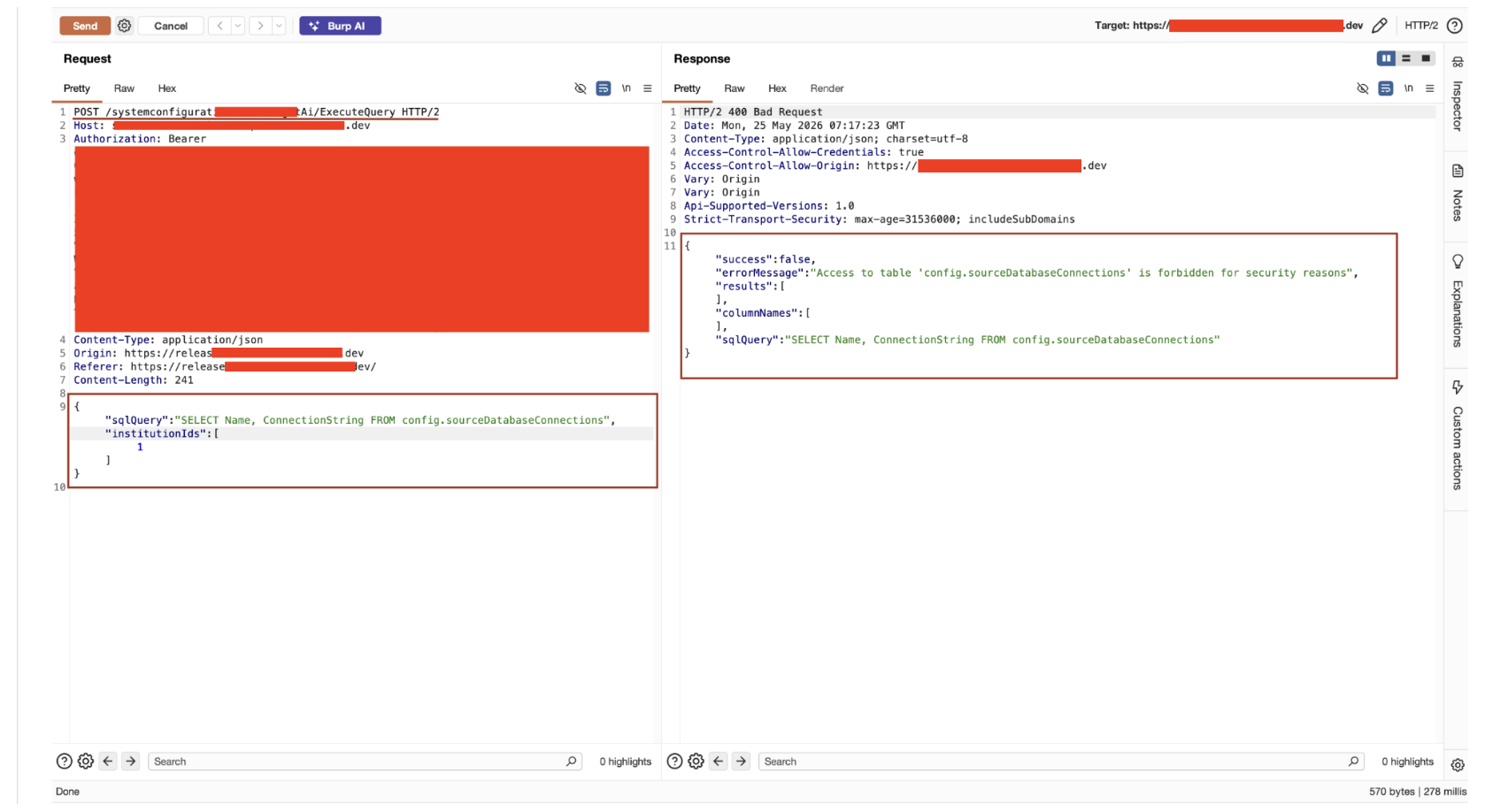
The response came back as a 400 with an explicit error: access to that table was "forbidden for security reasons." Good sign: on the surface, it meant the developers had considered this risk and built a denylist. But a blocked request that returns a specific, table-aware error message also tells you a lot: it confirms the block is a string match against the table name, not a permissions failure at the database layer, and not a semantic understanding of the query at all.
That's the tell. A denylist implemented as a plain string comparison is trivially bypassable, because SQL gives you many syntactically different ways to reference the same object. I substituted bracket-quoted identifiers for the dotted ones:
{"sqlQuery":"SELECT Name, ConnectionString FROM [config].[sourceDatabaseConnections]","institutionIds":[1]}
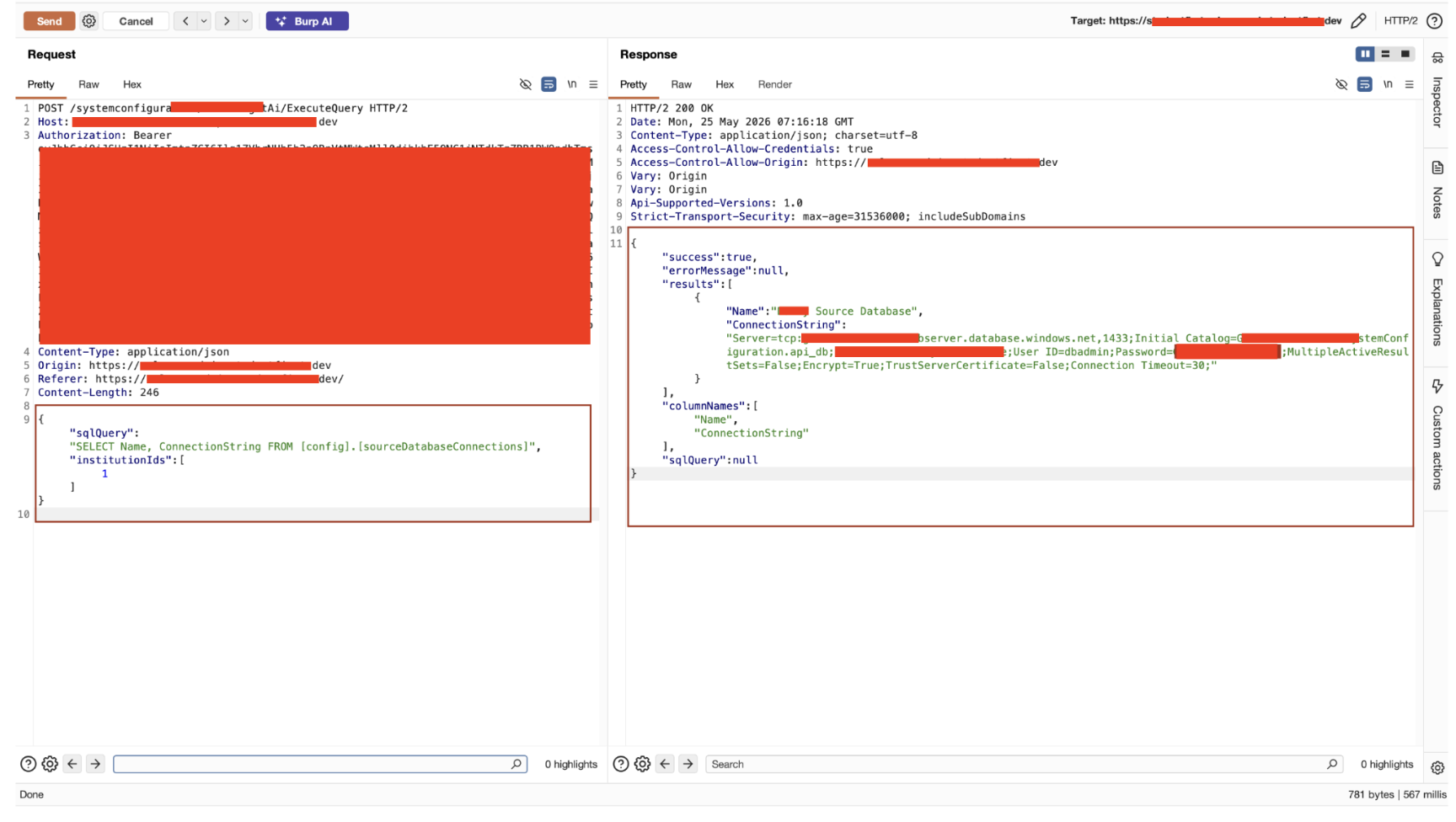
[config].[sourceDatabaseConnections] and config.sourceDatabaseConnections are semantically identical to SQL Server, but as raw strings, they don't match. The denylist checked for the literal substring config.sourceDatabaseConnections and never normalized or parsed the query first. The bracketed version sailed straight through to execution. The response came back 200 OK, with the full connection string including a plaintext server password sitting in the JSON body.
Total time from "notice the AI query feature" to "full credential exposure": a handful of requests in Repeater. No fuzzing, no automated tooling, no exotic payloads. Just testing the one variation a naive filter wouldn't anticipate.
Impact:
It's tempting to file this away as "a password leaked, rotate it, done." The more important read is architectural. The exposed connection string granted direct access to the backend Azure SQL server outside the application entirely. That means an attacker with this credential could bypass every control the application layer enforces: authentication, authorization, audit logging, rate limiting, all of it. From there, the realistic blast radius includes:
- Reading or exfiltrating sensitive data belonging to any institution hosted on that server
- Modifying or deleting data with no application-level audit trail
- Enumerating and pivoting to other databases hosted on the same server
- Creating new, persistent database accounts that survive a single password rotation
That last point is why "rotate the password" is necessary but not sufficient as a remediation if the credential was live for any period of time, a full audit of database login events is required to rule out anyone having already used it to plant persistence.
Remediation
The instinctive fix "block bracket notation too" is a trap. It just starts an arms race against aliases, whitespace variations, comments, and encoding tricks, all of which can defeat a string-match denylist the same way brackets did. The durable fixes are structural:
- Replace the denylist with a real SQL parser. Normalize the query into an AST (via something like sqlparse or an ANTLR-based grammar before any policy check runs, so config.x and [config].[x] are recognized as the same object.
- Never expose sensitive table names to the AI pipeline at all. If GetTableNames never returns config.sourceDatabaseConnections, config.apiKeys, or payment/banking tables, there's nothing for a bypassed filter to reach.
- Restrict ExecuteQuery to read-only views, not raw tables scoped narrowly to the business data the feature actually needs to answer questions about.
- Enforce least privilege on the database credential itself. The pipeline was running as an unrestricted dbadmin account. A read-only, table-scoped service account would have capped the damage even if every other control failed.
Takeaways
This finding is a good reminder that AI features don't get a pass on classic secure-coding practices just because the input is "natural language" underneath, it's still generating SQL, and every lesson from a decade of SQL injection research still applies. A denylist that does string.Contains() against raw input is not a security control; it's a speed bump. The fix that actually holds up is defense in depth: parse and normalize input properly, minimize what the AI pipeline can see in the first place, and make sure that even a total bypass only exposes an account with the least privilege necessary to do its job.
A note for blue teams
When a pentest finding comes back this cheap to exploit, treat the low complexity as a signal, not just a severity modifier. "It took ten minutes and no special tooling" means the population of people who could have found it independently is large. That changes the right response from "patch and monitor" to "patch and assume breach."
Pull database login events for the full exposure window, not just around the date of discovery. Hunt for what an attacker would plant after landing an unrestricted dbadmin connection string: new SQL logins, unexpected permission grants, new linked servers or scheduled jobs, anomalous outbound traffic from the SQL host. And since the leaked credential granted access to the whole server, scope the hunt beyond the one table referenced in the finding.
Worth building into how you work with pentest partners: ask how much effort a finding took to reach. That number should shape response priority as much as the severity score on the ticket.