
Methodology and where the real risks hide.
Supabase has been appearing more frequently in web and mobile application assessments. It fits modern JavaScript-heavy development well, giving teams a PostgreSQL database, authentication, storage, and other backend capabilities without requiring them to build everything from scratch. From a delivery perspective, that makes sense. Product teams can focus on their application's core functionality and reuse the plumbing.
From a security perspective, however, this also changes the game.
Traditionally, the database was hidden behind the backend. Users talked to the application, the application talked to the database, and direct access to the data layer was usually not exposed to the Internet over HTTPS. With Supabase, that separation is different. The browser or mobile app can interact with Supabase services directly, including the database API. To make that possible, the application normally contains the Supabase project URL and a public key that is used to initialize the client.
That is part of the expected deployment model. The public key isn't meant to be the security boundary. Authorization should be enforced by database permissions, Row Level Security (RLS), and the identity represented by the user's JWT.
That is where the mindset needs to change.
A public anon (anonymous) or publishable key is not automatically a vulnerability. That part is expected by design. The problem starts when that public access is combined with weak authorization logic, missing Row Level Security (RLS), exposed privileged keys, such as a secret or legacy service_role key, or sloppy storage configuration. RLS, in simple terms, allows PostgreSQL to decide which rows a particular user or role is allowed to read or modify. In that moment, what looks like a convenient backend can become a very convenient attack surface as well. With great power comes great responsibility.
We have already seen real-world examples of this. A recent case was the Moltbook incident, where an exposed anonymous key combined with missing RLS allowed unrestricted access to sensitive data at scale. If you want a public example of how bad this can get, it is worth reading the write-up from Wiz: [Exposed Moltbook Database Reveals Millions of API Keys](https://www.wiz.io/blog/exposed-moltbook-database-reveals-millions-of-api-keys).
The issue was also independently discussed and reproduced by other security researchers and covered by technology media, which provides some useful additional context beyond the original vendor write-up. I have included a few of those references below for anyone interested in digging deeper.
In this article, I want to focus on Supabase from a pentester's point of view. More specifically, I'll show how I approach it during assessments, what I enumerate first, and what kinds of test cases usually bring value.
Why Supabase Is Interesting to Test
For a pentester, Supabase is attention-catching for a very simple reason: it can expose a lot of interesting functionality through a clean HTTP interface.
Instead of hunting for some hidden internal API or undocumented backend path, you may get a direct route to:
-
database tables through REST
-
authentication flows
-
storage buckets
-
server-side functions
-
realtime features
Of course, whether that route is actually exploitable depends on how the project is configured. Supabase itself gives developers many building blocks for fine-grained control. That is exactly why it is interesting to test. We are not attacking the idea of Supabase. We are looking for the gap between what the developers intended and what the configuration actually allows.
Let's dive into the methodology.
1. Start With Enumeration
Like in many other assessments, the first step is enumeration. And for Supabase, that usually starts in JavaScript files, frontend source code, or decompiled mobile applications.
What am I looking for?
-
Supabase hostnames, often something ending with “.supabase.co”
-
initialization code such as createClient(...)
-
Apikey values
-
JWT tokens
-
References to tables, buckets, functions, or policies
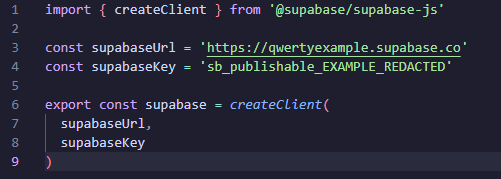
Example of Supabase configuration exposed in frontend code. The project URL and publishable key are expected to be available client-side and are not vulnerabilities by themselves.
I do not rely only on searching for .supabase.co, though. Sometimes the Supabase client is wrapped in another helper, the configuration is loaded dynamically, or some requests are proxied through another backend. That is why I usually combine source-code review with intercepted application traffic. If the application talks directly to Supabase, the network traffic will normally give it away sooner or later.
At minimum, you will often find a public publishable key, or the legacy anon key. That is normal. But if you find something more privileged, such as a secret key or legacy service_role key exposed in the client, then things get much more interesting. Those credentials are intended for trusted server-side use and can bypass RLS protections. That can very quickly become the keys to the kingdom.
Enumeration may start in the frontend, but I usually move quickly to confirming what is reachable on the Supabase side. These are not random paths. They map directly to the main Supabase services that applications commonly use:
-
/rest/v1/ - database REST API
-
/auth/v1/ - authentication
-
/storage/v1/ - file storage
-
/functions/v1/ - Edge Functions
-
/graphql/v1 — GraphQL, if the project uses it
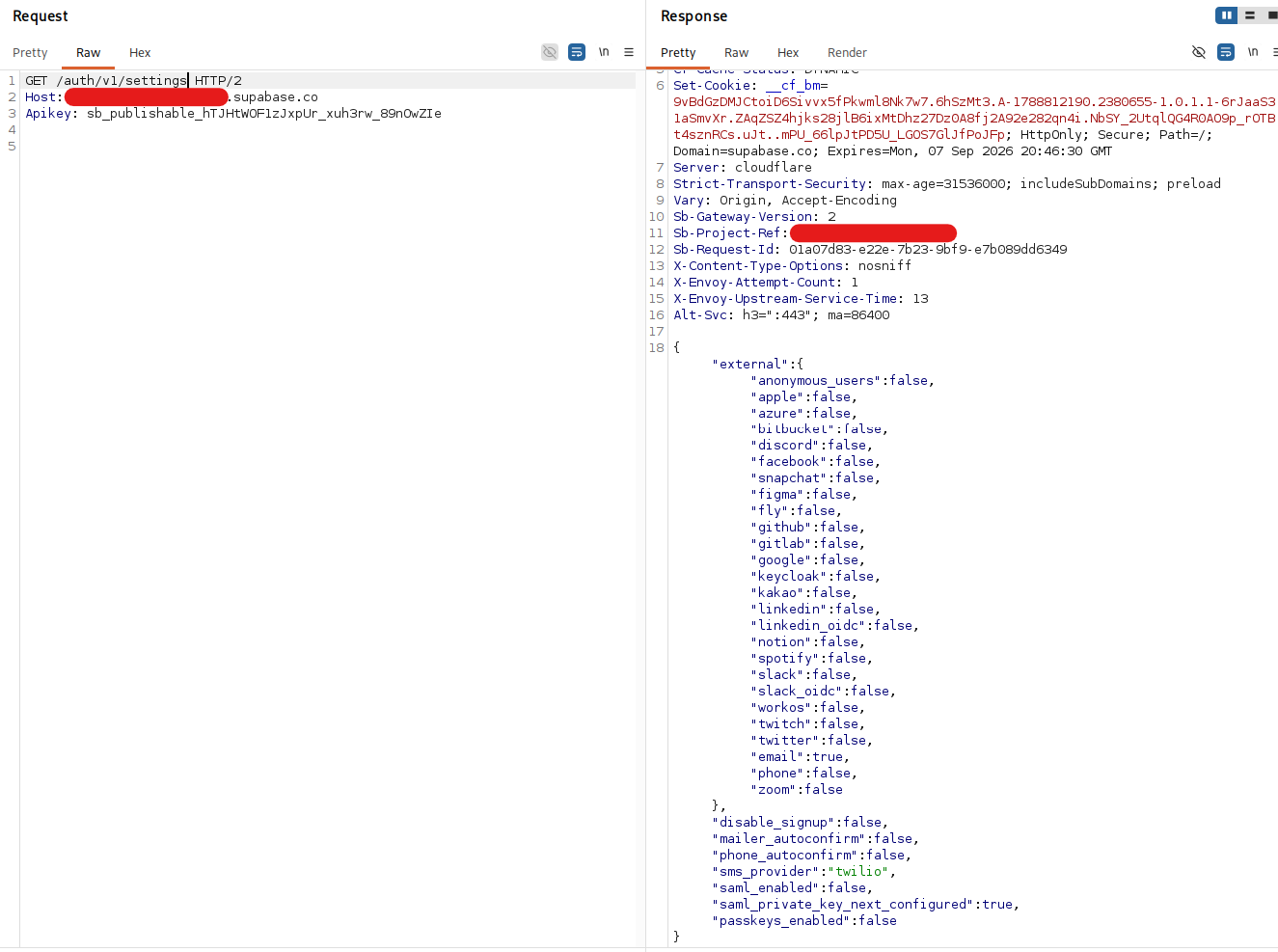
The Auth settings endpoint can reveal which authentication methods and registration options are enabled.
If I identify other services, I expand the scope as well. Realtime can expose subscriptions to database changes or application events, while Edge Functions are server-side functions exposed as HTTP endpoints. From my perspective, both simply become additional places where authorization or application logic may go wrong. Still, the REST endpoint is where I usually put the most hope in the beginning, because it is often the shortest path to the application's actual data.
If the schema is exposed or otherwise discoverable, that is immediately useful. Suddenly, we know table names, maybe columns, maybe relationships, and that gives structure to the rest of the test. If the schema is not directly visible, I try to infer it from:
-
JavaScript source code
-
Intercepted requests
-
Error messages
-
Predictable naming conventions
-
Targeted guessing or brute-forcing
There is no magic Supabase-specific wordlist here. These are just useful starting points before I adapt the list to the application itself. I usually start with common table names such as:
|
users profiles roles permissions user_roles sessions tokens api_keys organizations teams members memberships tenants workspaces workspace_members payments subscriptions plans invoices transactions billing posts comments messages notifications files uploads media assets logs audit_logs events activity_logs history settings configs feature_flags integrations webhooks |
And then I adapt that list based on the application's business logic. If I am testing a booking platform, I will try booking-related names. If I am testing a fintech app, I will think in terms of wallets, payouts, invoices, transfers, and ledgers. Sometimes verbose error messages will even leak a close table name and save you some guessing.
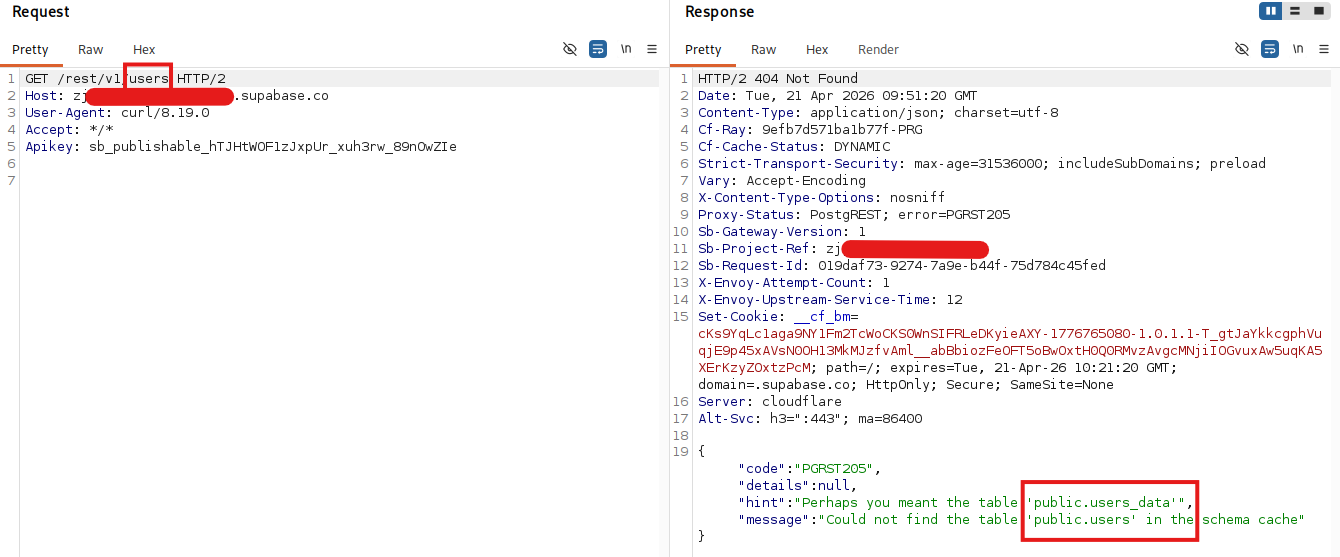
Error message disclosing a valid table name
Here comes the most interesting part. If RLS is disabled or overly permissive, a request to “/rest/v1/<table-name>” may return all rows from that table. That is often the most direct path to high-impact findings. Suddenly, you are not dealing with a subtle edge case. You are looking at direct data exposure.
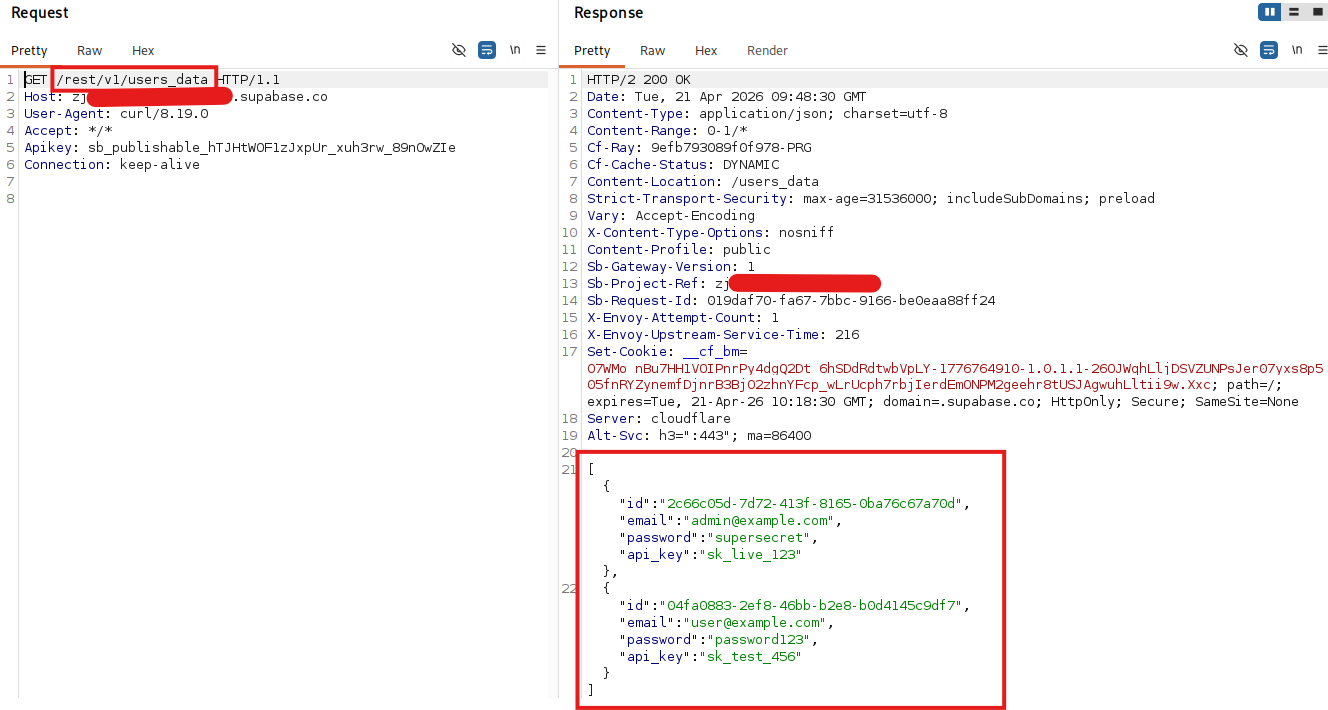
Missing RLS allows unauthenticated access to users_data
One small note: an empty response does not automatically mean everything is secure. It could mean the table is empty. It could mean your filters are wrong. It could also mean RLS is doing its job. That is why enumeration should not stop after one request. Whenever possible, I test this with data that I know exists. For example, I can create a record as user A, confirm that user A can retrieve it, and then request the same record as user B without authentication. That gives me much more confidence than simply looking at an empty [ ] response and assuming RLS works.
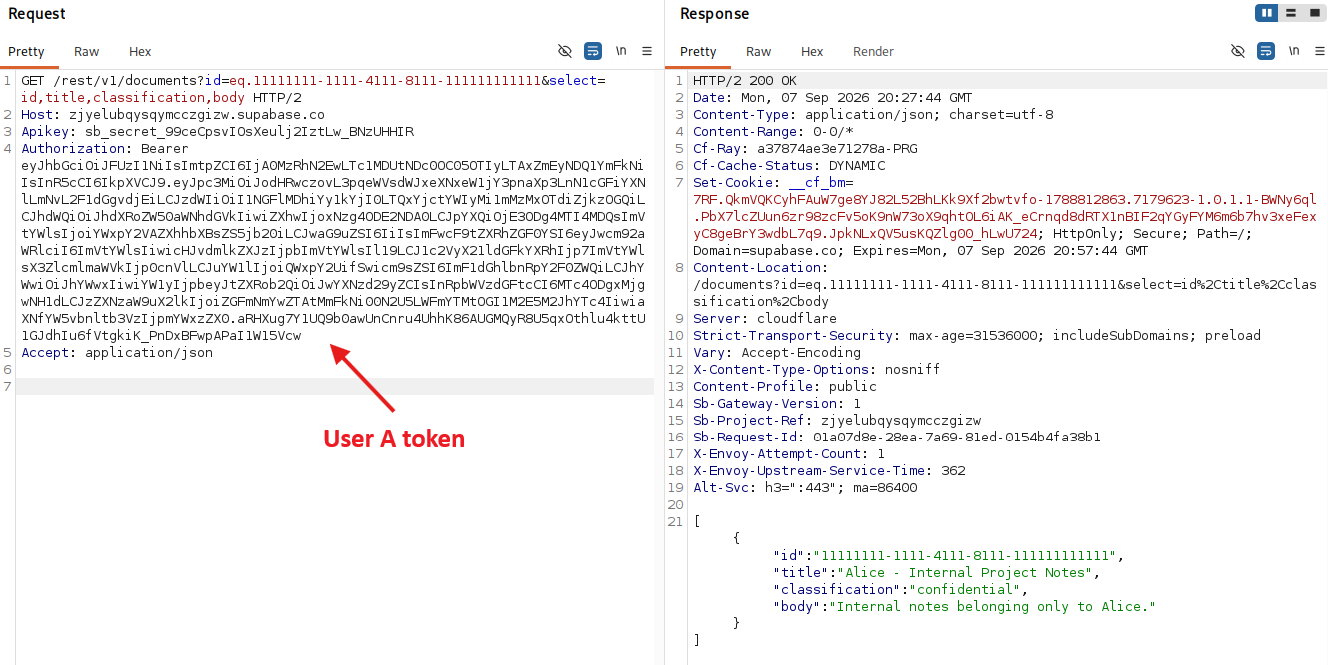
User A can retrieve the known record that belongs to them.
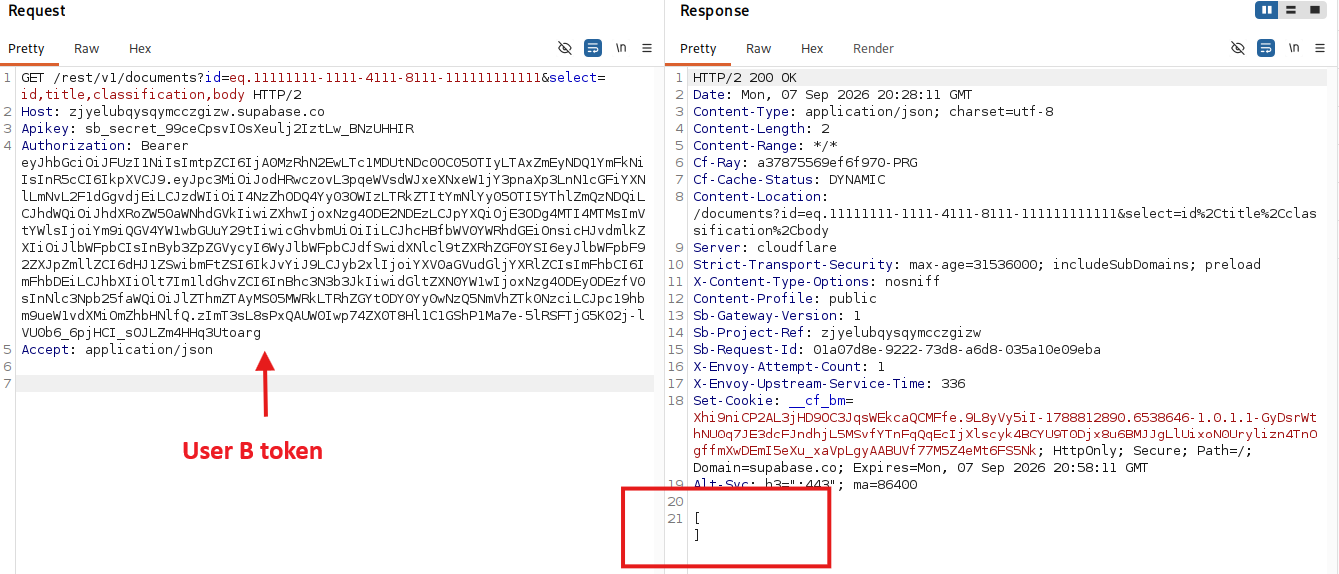
The same request from user B returns an empty response because RLS prevents access to the other user's record.
I also repeat the same process for writes where applicable. A table may correctly restrict SELECT, while an overly permissive INSERT, UPDATE, or DELETE policy still creates a problem.
Do not forget storage either. Misconfigured buckets (for example, public buckets used for sensitive files, predictable file paths) can expose uploaded files to unauthenticated users, and that can be just as damaging as exposed tables. I usually test storage in much the same way as database access: can I list objects, retrieve a known object, upload something, overwrite something, or delete something? And I repeat that from unauthenticated and authenticated contexts. A bucket that blocks listing can still be interesting if objects have predictable names and direct reads are allowed.
I usually combine static and dynamic enumeration here. Anything I discover in JavaScript goes into Burp, and anything I discover in Burp goes back into my notes and wordlists. Each new piece of information gives me something else to test.
Test cases for this phase:
-
Search JavaScript or mobile code for Supabase hostnames and keys
-
Identify all reachable Supabase endpoints
-
Confirm whether only the anon key is exposed
-
Attempt to discover table names, bucket names, and function names
-
Test direct unauthenticated access to REST and storage endpoints
2. Repeat the Process as an Authenticated User
Enumeration is the key, so the next step is doing it again, but this time with an authenticated user.
Before I start manually building requests, I simply use the application like a normal user and intercept the traffic. I sometimes call it the lazy way, but it is also the efficient way. The application already gives me valid requests, parameters, table names, filters, identifiers, and JWT tokens without me reinventing the wheel.
Then I replay those requests in Burp Repeater and start changing assumptions. What happens if I remove the user filter? Request more columns? Replace the object ID with one belonging to another user? Automation is useful for breadth, but manually manipulating known-good requests gives me the context to understand what the application expects and whether the backend actually enforces it.
At that point, the focus shifts from "What can I reach?" to "What changes when I am logged in?"
This is where misconfigured RLS often starts to show itself. Something that is hidden from an unauthenticated user may become overly available to any authenticated user. And "any authenticated user" is often much broader than the developers intended.
None of this is unique to Supabase. Authorization testing is authorization testing. What makes Supabase interesting is that the same client identity may interact directly with the database API, storage, Realtime, and custom functions. That gives us several authorization boundaries to compare inside the same platform.
With intercepted REST requests, I also get insight into how the frontend queries the database. That opens the door to manipulating:
-
Selected columns, for example “select=*”
-
Filters such as “eq”, “in”, or “or”
-
Sort and pagination parameters
-
Identifiers that the frontend normally locks to the current user
Very often, the frontend plays nice and sends a restricted query because the developer expected it to. A pentester, however, is not limited by the frontend. If the access control is only implemented in the client or if the policy is too broad, the data will show up.
This is also a good time to look beyond the REST API. If the project uses:
-
Storage buckets
-
Real-time subscriptions
-
Edge functions
then each of these is another place where authorization can drift away from what the business actually intended.
Test cases for this phase:
-
Access all identified endpoints using a valid JWT
-
Compare unauthenticated and authenticated responses
-
Try to retrieve additional columns and records
-
Modify filters to target other users' data
-
Check whether functions, subscriptions, or storage operations are too permissive
3. Iterate and Build an Authorization Matrix
Each round of enumeration gives more input into the next one. That is why I rarely see Supabase testing as a clean linear sequence. It is more like a loop.
New endpoints discovered while authenticated should be retested without authentication. New table names found in responses should go back into the wordlist. New buckets should be checked from multiple roles. If the application has more than one user role, each one deserves its own pass.
-
What I am really building during this phase is an authorization matrix.
-
Who can read what?
-
Who can write what?
-
Who can subscribe to what?
-
Who can upload where?
Note: The idea itself is not specific to Supabase. The Supabase-specific part is applying the same matrix across tables, storage objects, Realtime channels, and functions instead of treating the REST API as the whole application.
Once you think about Supabase in that way, it becomes easier to see the gaps. A table may be correctly protected for unauthenticated users but exposed to every logged-in user. A storage bucket may be hidden for reads but open for writes. A function may assume trusted input just because it is called from the frontend.
This iteration phase is not glamorous, but it is often where the higher-quality findings come from.
Test cases for this phase:
-
Retest newly discovered endpoints across all available roles
-
Validate reads, writes, updates, and deletes where applicable
-
Map which roles can access which tables, buckets, and functions
-
Confirm whether access matches the expected business logic
4. Do Not Stop at Access Control
Up to this point, most of the focus has been on enumeration and authorization. That makes sense because broken access control and missing RLS are some of the highest-value issues in Supabase environments.
But we should not forget that, at the end of the day, this is still a web-facing application stack. A lot of classic web test cases still apply.
Things worth checking:
-
Rate limiting on sensitive endpoints, such as login or password reset
-
Self-registration flows without proper verification
-
File uploads to storage buckets
-
Injection issues in edge functions or custom backend logic, especially when those functions use elevated privileges (for example, service_role)
-
Misconfigured CORS, especially dangerous browser trust decisions
-
Token storage in localStorage or sessionStorage
-
Application-level denial of service through expensive or repeated queries
That last point is underrated. Even if you cannot steal data, an exposed data-heavy query without rate limits can still be abused to create load and operational pain.
Also, if the frontend stores access tokens in a place that an XSS payload can easily read, then one client-side bug can quickly become an API compromise. That is not a Supabase-only issue, of course, but Supabase can amplify the impact because the token may directly grant API access to database and storage operations.
Defensive Perspective
The good news is that we are not defenseless here. Most of the issues above are not magic bugs hidden inside Supabase. They are configuration and design problems. That means they can also be systematically prevented.
Securing a Supabase deployment requires a small mindset shift, but the principles are straightforward.
Here is how I would approach it from the defensive side:
-
Follow the official Supabase security guidance (Security Advisor on your Supabase dashboard) and treat it as your baseline, not as optional reading.
-
Keep privileged keys like service_role strictly server-side. If it lands in client code, assume compromise.
-
Treat RLS as your main line of defense and test it like you would test any other authorization control.
-
Build an authorization matrix for tables, buckets, and functions, then verify it continuously.
-
Review storage bucket exposure as carefully as database exposure.
-
Use Supabase logs to look for suspicious API usage, repeated authorization failures, enumeration patterns, unexpected access to storage or functions, and unusually large data pulls.
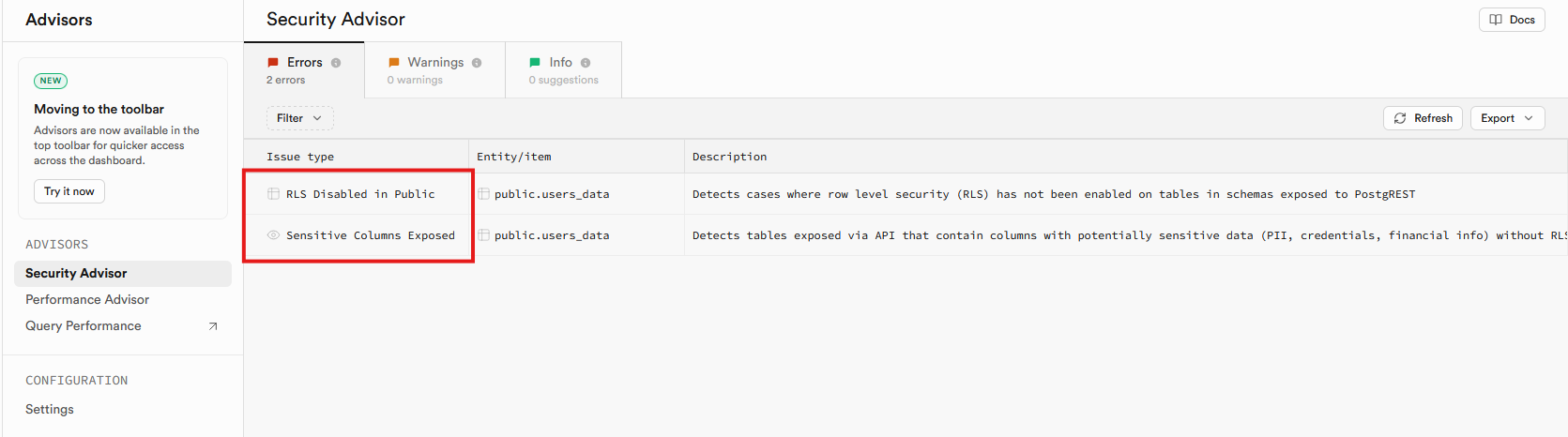
Security Advisor - your starting point to secure your Supabase
Supabase separates logs across different parts of the platform, so it is worth correlating API activity with database, authentication, storage, Realtime, and Edge Function logs. There usually is not one magic event saying "someone is enumerating your Supabase project." The interesting part is the pattern: repeated requests across tables, broad queries, authorization failures, unusual volumes, or privileged functions being called in ways you did not expect.
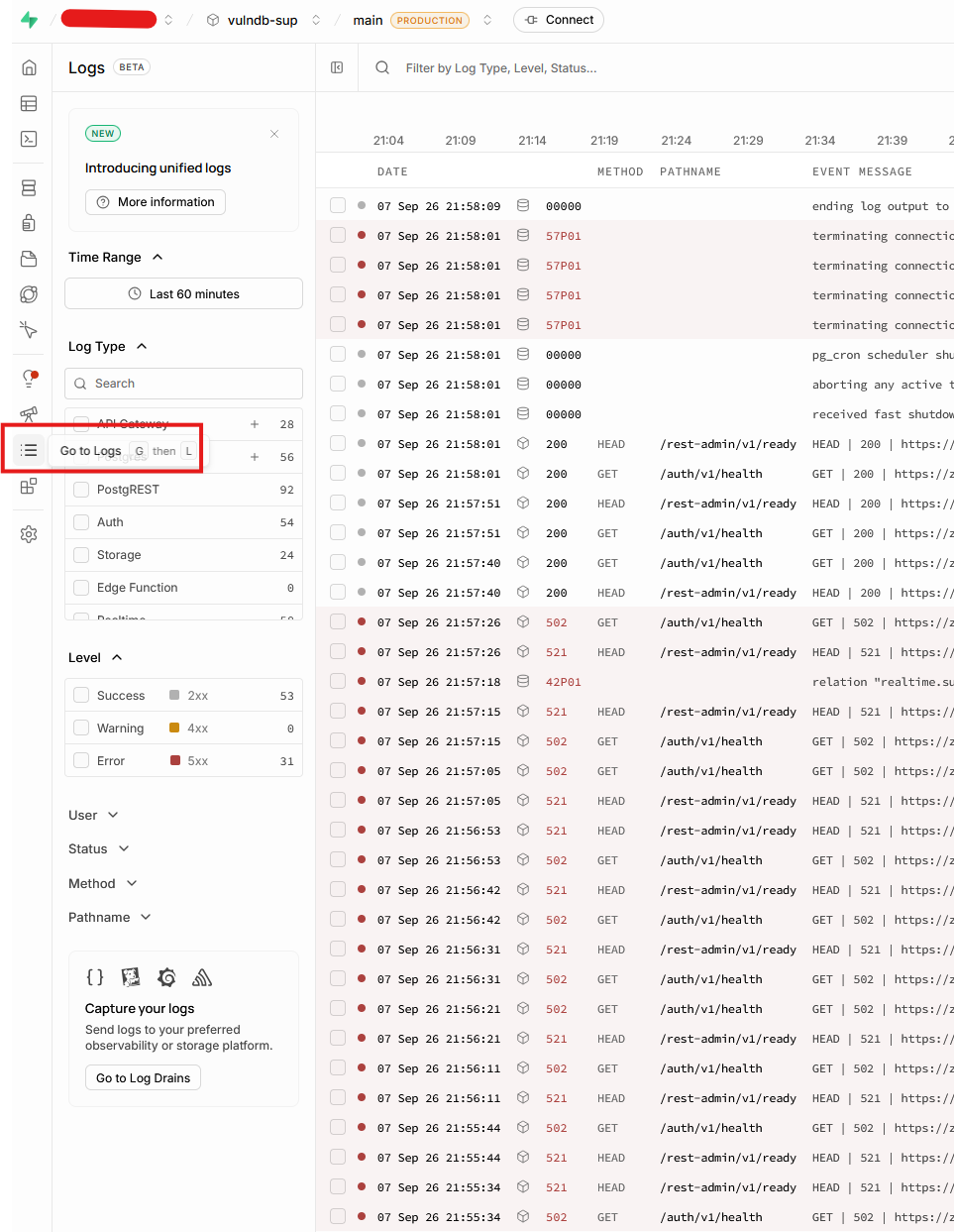
Logs Explorer gives defenders another view of the same API activity we are generating during testing.
The biggest trap is assuming that "using Supabase" means authorization is handled automatically. It is not. Supabase gives you powerful building blocks, but the application owner still needs to define what each role can do and verify that those rules really work.
Do not just write an RLS policy and hope for the best. Test what an unauthenticated user can read. Test what a normal authenticated user can modify. Test what happens if someone changes filters, requests more columns, or targets a different tenant. If a developer accidentally opens a table to the anon role, your tests should catch it before an attacker does.
Conclusion
From an attacker's perspective, Supabase is interesting because it moves valuable backend functionality closer to the client and exposes it through convenient interfaces. That does not make it insecure by default, but it does make misconfigurations much more visible and much more testable.
My approach is simple: enumerate from the frontend, identify keys and Supabase services, test unauthenticated access, repeat the process as an authenticated user, and keep iterating until I have a reliable authorization matrix. Then I expand into the classic web security test cases around auth, storage, token handling, functions, and abuse resistance.
In the end, I am usually hunting for one forgotten gap: one table without RLS, one bucket that is too public, one function that trusts too much, one role that can see more than it should.
If you are building on Supabase, take the time to verify those assumptions. It will make my job much harder.