
Introduction
While patch diffing a Windows Latest Cumulative Update (LCU) for vulnerability research, I needed to read the Component Based Servicing (CBS) assembly manifests it ships with. The files turned out to be delta-compressed against an internal Windows dictionary - a binary patch format, not plain XML - and I could not find public documentation describing how to decode them.
This sent me down a reversing path through wcp.dll and the Windows servicing stack. The delta engine turned out to be a different DLL than expected, and the data needed to decode the manifests was embedded inside wcp.dll itself.
This post covers:
- How the CBS manifest decompression pipeline works internally
- The relationship between wcp.dll, UpdateCompression.dll and msdelta.dll
- How to extract the needed data, and build a decode pipeline to obtain plain CBS XML manifests
- Practical pitfalls that will trip you up in implementation
Environment:
- OS: Microsoft Windows 11 Pro (10.0.26200 N/A Build 26200)
- wcp.dll - 10.0.26100.8112
- UpdateCompression.dll - 5.0.1.1
- msdelta.dll - 5.0.1.
Tools:
- IDA Free for static reverse engineering of wcp.dll, UpdateCompression.dll, and msdelta.dll. Any modern disassembler with a decompiler will do the same job - Ghidra (free), radare2 (free) are all viable alternatives.
- A hex editor for inspecting CBS manifest files.
- A PE resource viewer (e.g., Resource Hacker) for confirming that resource type 0x266 in wcp.dll contains the delta dictionary.
- 7-Zip
- Python 3
- Win-CBS-Manifest-Decoder - my scripts. Wraps the ApplyDeltaB call, extracts resources from wcp.dll, strips the DCM header, and writes the decoded XML.
Why Patch Diffing?
Microsoft does not publish source code or root-cause analyses for the vulnerabilities fixed on Patch Tuesday. Security bulletins name the affected component and severity, but not the bug. The patched binaries, however, are publicly shipped to every Windows machine on Windows Update.
Patch diffing compares a patched binary against its pre-patch version to isolate the code Microsoft changed. That delta is, by construction, where the vulnerability was fixed, and usually where it lived. For a researcher, this turns an advisory like "Remote Code Execution in the Windows TCP/IP stack" into a concrete, function-level starting point: a place to read code, build a test case, and reason about exploitability.
The technique is well-established - BinDiff and Diaphora exist for exactly this purpose - but it depends on being able to read what's inside the patch. For Windows LCUs, that's where this post comes in.
Required Knowledge
This post sits at the intersection of Windows servicing stack internals and binary reverse engineering. To follow the analysis comfortably, you should already be familiar with:
Reverse engineering
- Reading decompiler output from IDA or Ghidra.
- Navigating PE files: imports, exports, sections, and embedded resources.
- Basic x64 calling convention awareness - enough to map decompiler arguments back to documented API signatures when symbol names are mangled or stripped.
Implementation
- Python 3 and ctypes - defining Structure types, calling exported DLL functions, and managing buffer lifetimes across FFI boundaries.
- A Windows environment (or VM) where you can load and call native DLLs directly.
Everything else is introduced inline as it becomes relevant: what an LCU is and how to extract one, the CBS / WinSxS / manifest model, the PA delta formats, and the internals of msdelta.dll, UpdateCompression.dll, and wcp.dll.
If you are comfortable with the prerequisites above, you can read straight through. If some of them are unfamiliar but the topic interests you, read on anyway - the post is structured so that the surrounding context explains most of what you need, and the linked resources fill in the rest. Questions, corrections, or follow-up ideas are welcome - the easiest way to reach us is through our website or on LinkedIn.
Background
Windows Update Delivery: MSU Layout
Microsoft distributes security patches as MSU files (Microsoft Update Standalone Packages). An MSU is a signed container that wraps one or more CAB archives, catalog files (.cat for signature verification), and applicability metadata, evaluated by the Windows Update Agent before installation.
For Latest Cumulative Updates (LCUs), the monthly rollups that contain all security fixes, the CAB payload contains a WIM file (Windows Imaging Format). You may know this as “patch-Tuesday," which is typically when LCU’s are dropped. The WIM holds the CBS metadata for every assembly the patch delivers - the manifests, package descriptors, catalogues, and the index that locates each binary inside the sibling .psf.
Alongside the CAB, the MSU also carries a payload-side-file (.psf) - a single back-to-back blob containing the binary deltas for every file the LCU installs. The CAB and the .psf together make up an LCU.
|
LCU.msu ├── LCU.cab │ ├── LCU.wim │ │ ├── *.manifest ← assembly manifests (DCM-wrapped XML) │ │ ├── *.mum ← package manifests (plain XML) │ │ ├── *.cat ← per-package Authenticode catalogues │ │ └── express.psf.cix.xml ← index: <assembly>\<file> → (offset,length) in .psf │ └── LCU.xml ← top-level package descriptor ├── LCU.psf ← all binary payloads, packed back-to-back │ (each entry is a PA30 delta blob) ├── WSUSSCAN.cab ← applicability metadata └── LCU.cat ← outer Authenticode catalogue |
CBS: The Component Model
Component-Based Servicing (CBS) is the engine behind Windows installation and updates since Windows Vista. Every OS feature, driver, and system binary exists as a CBS assembly, an atomic unit of servicing identified by a unique name, version, architecture, and public key token.
Each assembly consists of:
- A manifest: XML describing the assembly's file inventory, registry operations, dependency graph, and security descriptors. The manifest is the authoritative record of what the assembly owns.
- A payload: the actual binaries, stored as forward or reverse differentials against a baseline.
Both halves are inert until something reads them. The servicing stack (TrustedInstaller → CbsCore.dll → wcp.dll) reads manifests to resolve dependencies, plan transactions, and stage files into the WinSxS component store. Manifests are the control plane - without them, the servicing stack cannot determine what to install.
That is the runtime picture. Inside the LCU itself - before any servicing transaction runs - the manifest and the payload are not even in the same file. The manifest is one of the .manifest entries in the WIM, in DCM-encoded form (the wrapper format reverse-engineered later in this post). The binaries live as PA30 deltas (one of the MS-Delta formats; primer further down) packed back-to-back inside the sibling .psf. A single index file inside the WIM, express.psf.cix.xml, is the bridge.
Visualised at the file-system level, the three pieces relate like this:
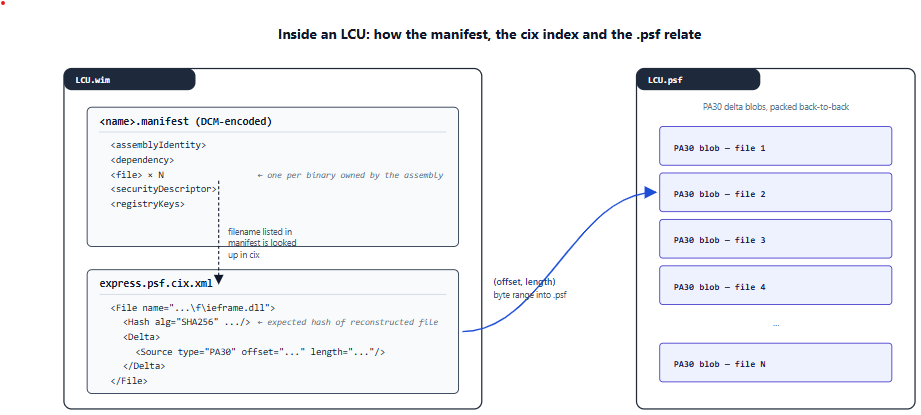
Each <File> entry in the cix carries a Windows-style relative path, an (offset, length) range into the sibling .psf, and SHA-256 hashes of both the source bytes and the reconstructed file. As a concrete example, the cix entry for ieframe.dll in KB5066793 - the Windows 11 22H2/23H2 LCU used as the test case throughout this post - looks like this:
|
<File id="37132" name="amd64_microsoft-windows-ieframe_31bf3856ad364e35_11.0.22621.6060_none_887187ca5304905e\f\ieframe.dll" length="245534"> <Hash alg="SHA256" value="10D21B63842BCF938F393AC21335BB97AB71E1DB63F019D1BCED2268E3E5CF4B"/> <Delta> <Source type="PA30" offset="841854484" length="241508"> <Hash alg="SHA256" value="CEE9EBE8584E85BFE2A861FFFE4832FEF2122CDB96924671D91F3C6F7D0C06B2"/> </Source> </Delta> </File> |
The manifest enumerates the binaries the assembly owns; the cix translates each of those names into a byte range in the .psf; the .psf holds the PA30 blob that, once applied, reconstructs the file. Decoded from DCM back to plain XML, the manifest itself looks like the excerpt below - truncated to the structurally relevant fragments, taken from the Microsoft-Windows-ieframe assembly in KB5066793:
|
<assembly xmlns="urn:schemas-microsoft-com:asm.v3" manifestVersion="1.0"> <assemblyIdentity name="Microsoft-Windows-ieframe" version="11.0.22621.6060" processorArchitecture="amd64" publicKeyToken="31bf3856ad364e35"/> <!-- language, buildType, versionScope: omitted --> <dependency discoverable="no" resourceType="Resources"> <dependentAssembly> <assemblyIdentity name="Microsoft-Windows-ieframe.Resources"/> </dependentAssembly> </dependency> <file name="ieframe.dll" destinationPath="$(runtime.system32)\" sourceName="ieframe.dll"> <securityDescriptor name="WRP_FILE_DEFAULT_SDDL"/> <asmv2:hash xmlns:asmv2="urn:schemas-microsoft-com:asm.v2" xmlns:dsig="http://www.w3.org/2000/09/xmldsig#"> <dsig:DigestMethod Algorithm="http://www.w3.org/2000/09/xmldsig#sha256"/> <dsig:DigestValue>+zBcRfucTG0q0xFjAcn0GYERYWiX8nKLf5m+yzFGAyk=</dsig:DigestValue> </asmv2:hash> </file> <!-- IESettingSync.exe, iemigplugin.dll, ieframe.dll.mun: same shape, truncated --> <registryKeys> <registryKey keyName="HKEY_CLASSES_ROOT\CLSID\{10BCEB99-FAAC-4080-B2FA-D07CD671EEF2}"> <registryValue name="" valueType="REG_SZ" value="IE Recovery Store"/> </registryKey> <!-- truncated --> </registryKeys> </assembly> |
That's one manifest. An LCU ships tens of thousands of them - and for a security researcher, the question is not what they contain individually but which ones changed in this update. LCUs are cumulative. Every LCU ships the entire component store, not just the assemblies changed in this specific update. In my test case (KB5066793 for Windows 11 22H2/23H2), a single LCU WIM contained over 30,000 manifests, the vast majority of which were carried forward unchanged from previous months.
For patch diffing, the question is: "Which of these 30,000+ assemblies actually changed in this update?" Doing binary diffing across the entire payload is impractical. Decoded manifests solve this: each manifest contains the assembly version and SHA-256 hashes for every file it owns. A text diff across two decoded manifest sets identifies the changed assemblies in seconds:
|
Without decoded manifests: 30,000+ files (patched) ──┐ ├── binary diff every file ──> impractical 30,000+ files (vulnerable) ──┘ With decoded manifests: 30,000+ manifests (patched) ──┐ ├── text diff ──> ~200 changed ──> targeted binaries 30,000+ manifests (vulnerable) ──┘ |
Decoded manifests don't replace binary diffing. They tell you which DLLs to pull for tools like BinDiff or Diaphora, so you're not blindly diffing gigabytes of unchanged files.
File Formats Reference
|
Format |
Role |
Tool to Extract |
|
.msu |
Signed delivery container. Parsed by wusa.exe and Windows Update Agent. |
expand.exe -F:* <msu> <dir> |
|
.cab |
Cabinet archive with LZX/MSZIP compression. |
expand.exe or 7z |
|
.wim |
Single-instance image format. Deduplicates identical files across components. |
7z, wimlib, or DISM /Apply-Image |
|
.mum |
Microsoft Update Manifest. Package-level XML metadata - identity, applicability rules, and component assembly references. Plain XML, no decoding needed. |
Already extracted with WIM |
|
.cat |
Authenticode security catalog. Contains cryptographic hashes for file integrity verification. Not needed for patch diffing. |
Already extracted with WIM |
Standard tools handle MSU → CAB → WIM extraction without issues. The problem starts after extraction: the manifest files inside the WIM are not plain XML.
The Problem: CBS Manifests Are Not Plain XML
After extracting a WIM from an LCU, open any manifest file in a hex editor and you'll see this:
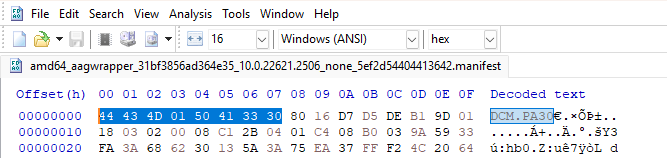
The first 4 bytes are 44 43 4D 01 - the ASCII string DCM followed by \x01. Immediately after, a PA30 signature marks the start of a delta-compressed payload. This is not XML. It's a compressed binary format that Windows decodes internally during servicing to produce the actual manifest.
Standard Windows tools don't help:
- expand.exe - extracts the CAB/WIM layers but does not decode DCM-wrapped content
- DISM /Apply-Image - mounts WIM images but doesn't expose individual manifest decompression
- sfc, DISM /Online - operate on the live component store, not on offline packages
- Opening the file as XML - fails immediately; parsers reject the binary header
The servicing stack handles this transparently: wcp.dll detects the DCM header, loads a decompression dictionary from its own PE resources, and applies the delta to produce plain XML before processing the manifest. But this only happens during an active servicing transaction on a running Windows system.
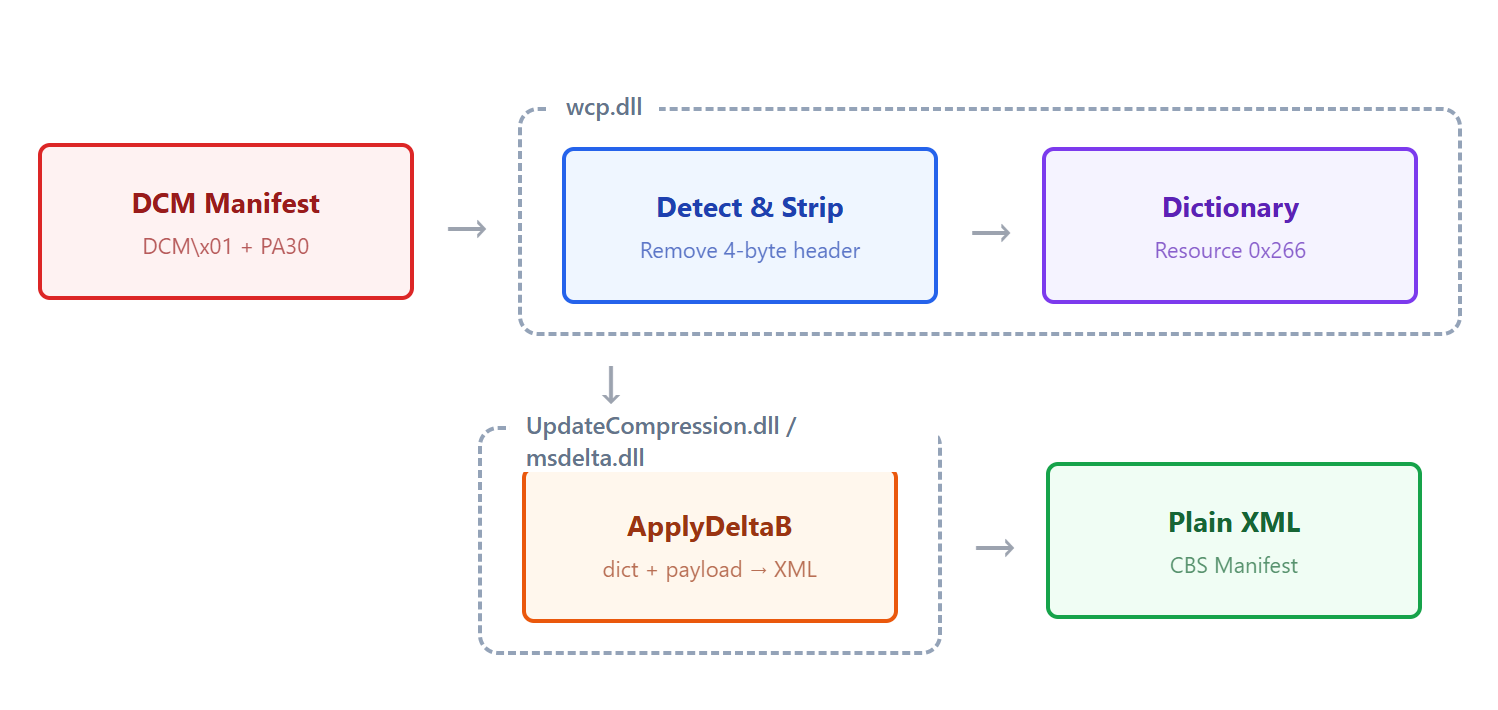
For patch analysis - comparing manifests between two LCU versions to identify changed components - this creates a gap: you have the files, but you can't read them without understanding the decompression pipeline.
Prior Art
Two existing tools handle related problems:
wcpex
Link: https://github.com/smx-smx/wcpex/tree/master
wcpex is a C tool that decompresses CBS manifests by loading wcp.dll at runtime. It resolves four internal functions via mangled C++ symbols:
- GetCompressedFileType
- InitializeDeltaCompressor
- DeltaDecompressBuffer
- LoadFirstResourceLanguageAgnostic
The tool extracts a decompression dictionary from wcp.dll's own PE resources (resource type 0x266, name 1) using LoadFirstResourceLanguageAgnostic, then passes it along with the manifest (minus the 4-byte DCM header) to DeltaDecompressBuffer.
wcpex demonstrated that resource 0x266 is the dictionary. The main limitation is that it relies on undocumented mangled C++ symbols from wcp.dll (e.g.,?DeltaDecompressBuffer@Rtl@Windows@@...), which are internal implementation details that could change between Windows versions. wcpex works, but it doesn't document the format or the pipeline.
delta_patch.py
Link: https://gist.github.com/wumb0/9542469e3915953f7ae02d63998d2553
delta_patch.py is a Python ctypes wrapper around msdelta.dll's ApplyDeltaB function. It's designed for general-purpose delta patching - applying PA19/PA30/PA31 forward and reverse diffs to files.
The tool has no awareness of DCM headers, CBS manifests, or the 0x266 dictionary. It could technically be used to decode a manifest if you already knew to strip the DCM header and supply the 0x266 resource as the base file - but nothing in the tool or its documentation suggests this is possible.
Comparison
|
Tool |
API Layer |
CBS/DCM Awareness |
Dictionary Handling |
|
wcpex |
wcp.dll |
Yes |
Extracts 0x266 at runtime from wcp.dll |
|
delta_patch.py |
msdelta.dll (ApplyDeltaB) |
No |
User supplies the base file manually |
|
This research |
msdelta.dll or UpdateCompression.dll (ApplyDeltaB) |
Yes |
Pre-extracted 0x266 dictionary |
Reversing wcp.dll: The Decompression Pipeline
To understand how Windows actually decodes these manifests, I reversed the decompression path inside wcp.dll (version 10.0.26100.8112). The pipeline has three stages:
Stage 1: Initialize the Delta Engine
Windows::Rtl::InitializeDeltaCompressor is responsible for loading the delta compression library. My expectation was to find a reference to msdelta.dll. Instead, the function resolves UpdateCompression.dll:
|
GetModuleHandleExW(0, L"UpdateCompression.dll", &phModule); |
The following IDA Free decompiler output shows the GetModuleHandleExW call resolving UpdateCompression.dll instead of msdelta.dll:
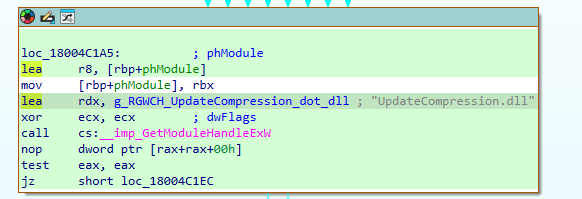
Once the module handle is obtained, the function resolves six API entry points via GetProcAddress:
|
qword_18042C0C0 = GetProcAddress(hLibModule, "CreateDeltaB"); qword_18042C0D0 = GetProcAddress(hLibModule, "ApplyDeltaB"); qword_18042C0A0 = GetProcAddress(hLibModule, "ApplyDeltaGetReverseB"); qword_18042C0D8 = GetProcAddress(hLibModule, "GetDeltaInfoExB"); qword_18042C0B0 = GetProcAddress(hLibModule, "GetDeltaSignatureB"); qword_18042C0A8 = GetProcAddress(hLibModule, "DeltaFree"); |
IDA Free's decompiler output showing the six GetProcAddress calls storing function pointers into global variables:
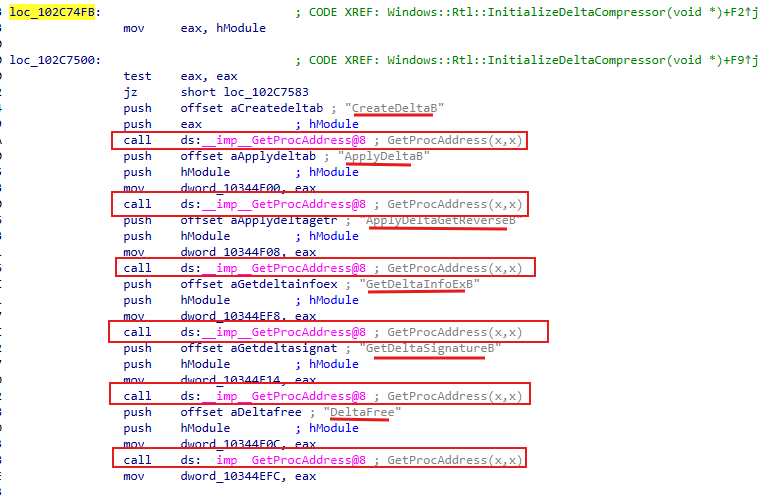
These function pointers are stored in global variables and called later in the pipeline. The resolved API surface is identical to what msdelta.dll exports (same function names, same signatures) but loaded from a different DLL entirely.
I searched wcp.dll's entire string table for "msdelta" (both ASCII and Unicode): zero results. On this build (10.0.26100.8112), the servicing stack uses UpdateCompression.dll as its delta engine. I'll cover the differences between the two DLLs in a later section.
Stage 2: Load the Dictionary
The next step in the pipeline extracts the delta dictionary from wcp.dll's own PE resources. The function that performs this load has a long mangled C++ symbol; for readability I've renamed it to LoadDictionary in IDA Free . Its body is a single call to Windows::Rtl::LoadFirstResourceLanguageAgnostic
|
Windows::Rtl::LoadFirstResourceLanguageAgnostic( nullptr, 0x80000000, (HINSTANCE)0x266, // resource type (const wchar_t *)1, // resource name &dictionary_blob, ...); |
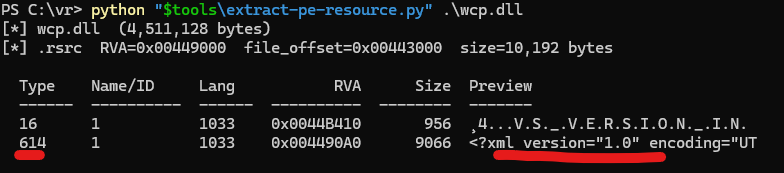
Resource type 0x266 (decimal 614), name 1. This is the base buffer that the delta is applied against - without it, ApplyDeltaB has no base to apply the delta against.
Resource 0x266 can be extracted from wcp.dll with a Python script - extract-pe-resource.py - that walks the PE resource directory and writes the entry to disk. The listing below shows the script's output for wcp.dll, with the dictionary at Type 614 (decimal 0x266), Name 1; the Preview column confirms its contents begin with <?xml version="1.0":
Stage 3: Apply the Delta
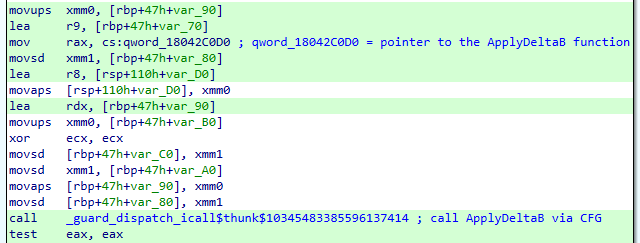
Windows::Rtl::DeltaDecompressBuffer calls through to the resolved ApplyDeltaB function pointer (from UpdateCompression.dll):
|
// ApplyDeltaB(flags=0, &source, &delta, &output) qword_18042C0D0(0, &dictionary_input, &manifest_delta, &output); |
The manifest's 4-byte DCM header is stripped before this call (consistent with wcpex passing headerSize = 4). The dictionary blob from Stage 2 is the source buffer. The output is the plain XML manifest.
The decompiler output for DeltaDecompressBuffer, showing the indirect call to ApplyDeltaB through the stored function pointer:
Finding: UpdateCompression.dll vs msdelta.dll
After discovering that wcp.dll loads UpdateCompression.dll instead of msdelta.dll, I reversed both DLLs to understand how they relate to each other.
UpdateCompression.dll (version 5.0.1.1)
Exports the same API surface as msdelta.dll:
- ApplyDeltaB
- ApplyDeltaGetReverseB
- ApplyDeltaProvidedB
- CreateDeltaB
- DeltaFree
- DeltaNormalizeProvidedB
- GetDeltaInfoB
- GetDeltaInfoExB
- GetDeltaSignatureB
Internally, ApplyDeltaB calls into a DeltaPatch::Apply method with COM-style reference counting. No reference to msdelta.dll in its strings or imports. This is a standalone implementation, not a wrapper.
msdelta.dll (version 5.0.1.1)
Uses a component-based architecture (compo:: namespace) with factory patterns. Its ApplyDeltaA function checks the delta's magic bytes:
|
// 959529296 decimal = 0x39314150 = "PA19" in little-endian if (*(_QWORD *)(v5 + 40) >= 4u && **(_DWORD **)(v5 + 32) == 959529296) { // PA19 detected → legacy code path return compo::PullcapiContext::ApplyLegacyDelta(a2, a3); } else { // PA30/PA31 → modern component factory pipeline compo::ComponentFactory::ProcessComponent( compo::PullcapiContext::g_applyPatchFactory, ...); } |
Key Difference
msdelta.dll supports both PA19 (legacy) and PA30/PA31 (modern) delta formats. UpdateCompression.dll handles only PA30/PA31 - there is no PA19 magic check in its code.
|
msdelta.dll |
UpdateCompression.dll |
|
|
PA19 support |
Yes (ApplyLegacyDelta) |
No |
|
PA30/PA31 support |
Yes (component factory) |
Yes (DeltaPatch::Apply) |
|
Architecture |
Component-based (compo::) |
Direct C++ class |
|
Used by wcp.dll |
No |
Yes |
Note: what are PA19, PA30, and PA31?
These are the four-byte ASCII magic strings at the head of a Microsoft delta blob and identify three generations of the same binary patch format, sometimes referred to collectively as MS-Delta.
- PA19 - the legacy format. Used by older Windows servicing and update tooling. Still supported by msdelta.dll for backward compatibility.
- PA30 - the modern format introduced with Component Based Servicing in Windows Vista. Every DCM-wrapped manifest in this post is a PA30 blob; every binary in LCU.psf is a PA30 blob.
- PA31 - a later refinement of PA30. Handled by the same code path inside both DLLs (no separate magic check), so for the purposes of the decode pipeline above, PA30 and PA31 are interchangeable.
Microsoft's official surface for these formats is the ApplyDeltaB / CreateDeltaB Win32 API, documented on Microsoft Learn. The on-the-wire byte layout is not officially documented, which is why all existing tooling - delta_patch.py, wcpex, and the decoder built in this post - works at the API level rather than parsing the bytes directly. Readers who want more detail can search for "MS-Delta PA30"; the format has been partially reverse-engineered in several public projects, but there is no first-party reference document.