
This is Part 2 of our previous blog post, Decoding Windows CBS Manifests: Reversing the DCM/PA30 Delta Format.
The Decode Pipeline
The decoding pipeline has four steps:
- Extract resource 0x266 from wcp.dll - this is the delta dictionary
- Read the DCM-wrapped manifest and strip the 4-byte DCM\x01 header
- Call ApplyDeltaB in UpdateCompression.dll or msdelta.dll with the dictionary as the source and the stripped manifest as the delta
- Output: plain XML manifest
The following Python snippet calls ApplyDeltaB via ctypes to decode a single manifest:
|
import ctypes import ctypes.wintypes # DELTA_FLAG_TYPE is a 64-bit flags field (ULONGLONG on x64) DELTA_FLAG_TYPE = ctypes.c_uint64 class DELTA_INPUT(ctypes.Structure): # On x64: lpStart(8) + uSize(8) + Editable(4) + padding(4) = 24 bytes _fields_ = [ ("lpStart", ctypes.c_void_p), # pointer to buffer (8 bytes on x64) ("uSize", ctypes.c_size_t), # buffer length (8 bytes on x64) ("Editable", ctypes.c_int), # BOOL = c_int (4 bytes + 4 padding) ] class DELTA_OUTPUT(ctypes.Structure): _fields_ = [ ("lpStart", ctypes.c_void_p), # allocated by ApplyDeltaB ("uSize", ctypes.c_size_t), # output length ] def apply_delta_b(dll, source_bytes: bytes, delta_bytes: bytes): """ Calls ApplyDeltaB(flags, source, delta, &output). source_bytes = dictionary (resource 0x266 from wcp.dll) delta_bytes = manifest payload with DCM header already stripped dll = loaded msdelta.dll or UpdateCompression.dll handle """ # Pin buffers in memory so ctypes pointers remain valid src_buf = ctypes.create_string_buffer(source_bytes) dlt_buf = ctypes.create_string_buffer(delta_bytes) src = DELTA_INPUT() src.lpStart = ctypes.cast(src_buf, ctypes.c_void_p) src.uSize = len(source_bytes) src.Editable = False dlt = DELTA_INPUT() dlt.lpStart = ctypes.cast(dlt_buf, ctypes.c_void_p) dlt.uSize = len(delta_bytes) dlt.Editable = False out = DELTA_OUTPUT() fn = dll.ApplyDeltaB fn.restype = ctypes.wintypes.BOOL fn.argtypes = [DELTA_FLAG_TYPE, DELTA_INPUT, DELTA_INPUT, ctypes.POINTER(DELTA_OUTPUT)] # flags = 0 means no special options (no DELTA_FLAG_NONE required) ok = fn(DELTA_FLAG_TYPE(0), src, dlt, ctypes.byref(out)) if not ok: return False, ctypes.GetLastError(), b"" # Copy output before freeing - DeltaFree releases the internal buffer result = ctypes.string_at(out.lpStart, out.uSize) dll.DeltaFree.restype = ctypes.wintypes.BOOL dll.DeltaFree.argtypes = [ctypes.c_void_p] dll.DeltaFree(out.lpStart) return True, 0, result |
Here is the output of running the decode script against a real DCM-encoded manifest extracted from the KB5066793 LCU WIM.

The scripts used in this research are available on my GitHub: Win-CBS-Manifest-Decoder
Verification: msdelta.dll vs UpdateCompression.dll
To verify that both DLLs produce the same result, I decoded the same manifest from KB5066793 using msdelta.dll and UpdateCompression.dll. The following output shows both runs:
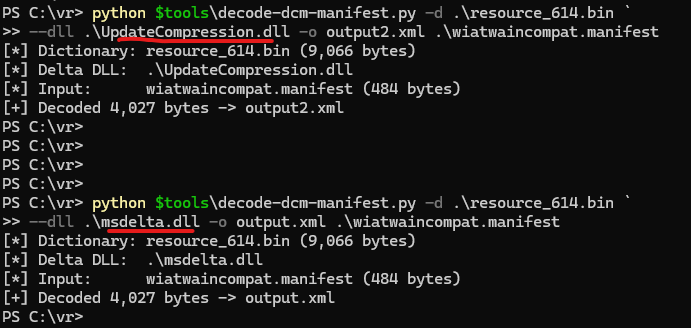
The two outputs are byte-for-byte identical. Same size (4,027 bytes), same XML content, same hashes. Both DLLs produce the same result for PA30 deltas, despite being different codebases internally.
Two practical consequences follow. First, an offline decoder is not tied to whichever DLL the running servicing stack happens to load. msdelta.dll and UpdateCompression.dll can be used interchangeably for CBS manifests, so a researcher uses whichever is available on the analysis host and switches freely if a future Windows build moves the servicing stack between them. Second, byte-equal output from two unrelated codebases is a free correctness check on the PA30 reading itself: a match between two codebases that share an API but no source is strong evidence the decode is right, not an artefact of one particular library.
So the --dll flag doesn't affect the output. Use whichever DLL you have.
CBS Filenames and Path Handling
CBS component names get truncated by 7-Zip during WIM extraction, producing filenames like:
|
x86_microsoft-windows-w..tion-wiatwaincompat_31bf3856ad364e35_10.0.22621.3527_none_dea2a2a3b3313ebb.manifest |
The “..” in “w..tion” is not directory traversal - it's a literal part of the filename. But Python's pathlib.Path doesn't know that. When you pass a relative path containing this filename, Path.resolve() and os.path.normpath() will collapse the .. as if it means "go up one directory", breaking the path silently.
The fix: resolve the parent directory and the filename separately.
|
def safe_resolve(raw_path: str) -> Path: p = Path(raw_path) parent = p.parent.resolve() # resolve ".." for real directory traversal return parent / p.name # keep the filename as-is |
This is easy to miss, but it will show up immediately when you try to batch-process manifests from an extracted WIM.
Conclusion
The CBS manifest decompression pipeline has three components:
- wcp.dll orchestrates the decompression
- UpdateCompression.dll (not msdelta.dll) provides the delta engine
- PE resource 0x266 embedded in wcp.dll supplies the dictionary
Extracting this dictionary and calling ApplyDeltaB directly is enough to decode any DCM-wrapped manifest. The advantage over wcpex is that ApplyDeltaB is a stable, exported Win32 function present across Windows versions, while wcpex depends on undocumented mangled C++ symbols tied to a specific wcp.dll build.
Along the way, reversing the pipeline revealed two details I did not find covered in existing public resources:
- On the tested build (10.0.26100.8112), the Windows servicing stack uses UpdateCompression.dll, not msdelta.dll, as its delta engine.
- UpdateCompression.dll and msdelta.dll are separate implementations of the same API. Both produce identical output for PA30 deltas, but msdelta.dll additionally supports the legacy PA19 format through a distinct code path.
What this enables
With decoded manifests, the patch diffing workflow becomes scriptable: extract manifests from both a patched and vulnerable LCU, decode them to XML, and diff the component versions and file hashes to identify which binaries changed. Instead of diffing gigabytes of binaries, you diff text files and get a short list of what to analyze.
In a follow-up post, we'll apply this pipeline to a real CVE - walking through the full process from downloading two LCU packages to identifying the patched binaries and examining the actual code changes.